
If you’ve ever wondered what SEO actually means, you’re not alone. For many small business owners who manage their own website, SEO (Search Engine Optimisation) feels like a digital mystery. Whether you’re a small business in Solihull, Birmingham or beyond, understanding SEO is key to growing your visibility online.
This guide breaks down the meaning of SEO, explains why SEO is so important, and shares simple SEO tips to help you drive more traffic to your website.
SEO, or Search Engine Optimisation, is the process of improving your website, using certain techniques and processes. These will help your website appear higher in search engine results pages (or SERPs).
The stronger the SEO practices on your website are, the stronger the signals you will be sending to search engines, such as Google, about who you are and what services you are offering. When Google has a clear understanding of what your website is all about, it will display your website in relevant results pages. When you appear more often, people will be more likely to see your business, click through to your website and engage with your content.
SEO helps your business by driving traffic to your website without the need for paid or sponsored adverts. It means that your business will be shown more regularly in search results which encourages more website visits. Not only that, but it also ensures that the traffic you are receiving is relevant traffic.
Relevant traffic is the ultimate goal for a website. This traffic will spend a longer time on your website, engage with your brand and be more likely to become a loyal customer for the future.
The compound benefit over time of SEO would then be:
SEO is a really cost-effective way of driving business as it is a long-term strategic investment, whereas paid sponsorship is best used to drive the required traffic in the immediate term.
On-page SEO (or On-Site SEO) refers to the practice of optimising the content and HTML source code of individual pages on your website to help them rank higher in search engine results.
Think of it like carefully crafting each page of your website to be its best self. SEO optimised pages are tidy and clear, valuable to the reader, and easy for both users and search engines to understand.
On-page SEO is all about what you control directly: your content, structure, internal links, and HTML tags.
Done right, on-page SEO sends a clear message to search engines about:
What your page is about
Who the intended audience is
How valuable it is to users
Where it should rank in search results
Google’s algorithm gets smarter all the time through regular core updates and so modern on-page SEO isn’t just about ticking boxes and splashing the right words on the page. It’s about creating genuinely useful, well-structured content that provides webusers with the genuinely useful content they need.
Keywords are the words and phrases your audience type into search engines when looking for information.
You should make sure every page, blog or piece content is structured around a keyword or phrase that is relevant to your business and your audience.
Think like your audience and start scribbling down as many keywords that somebody might search to find your business as you can e.g. “seo specialist”.
Then include local variations such as “seo specialist solihull” or “seo specialist birmingham”.
Keep going until you have a list that covers all the services you offer and that is a complete summary of who you are and what you do.
While you might think that you know exactly what people might search, there are MANY tools out there that collect search data and can validate your list.
You’ll probably find you need to reword your search terms to mimic the search behaviour of someone who isn’t an expert – e.g instead of ‘seo specialist’, someone might search ‘how do i get more visits to my website?’.
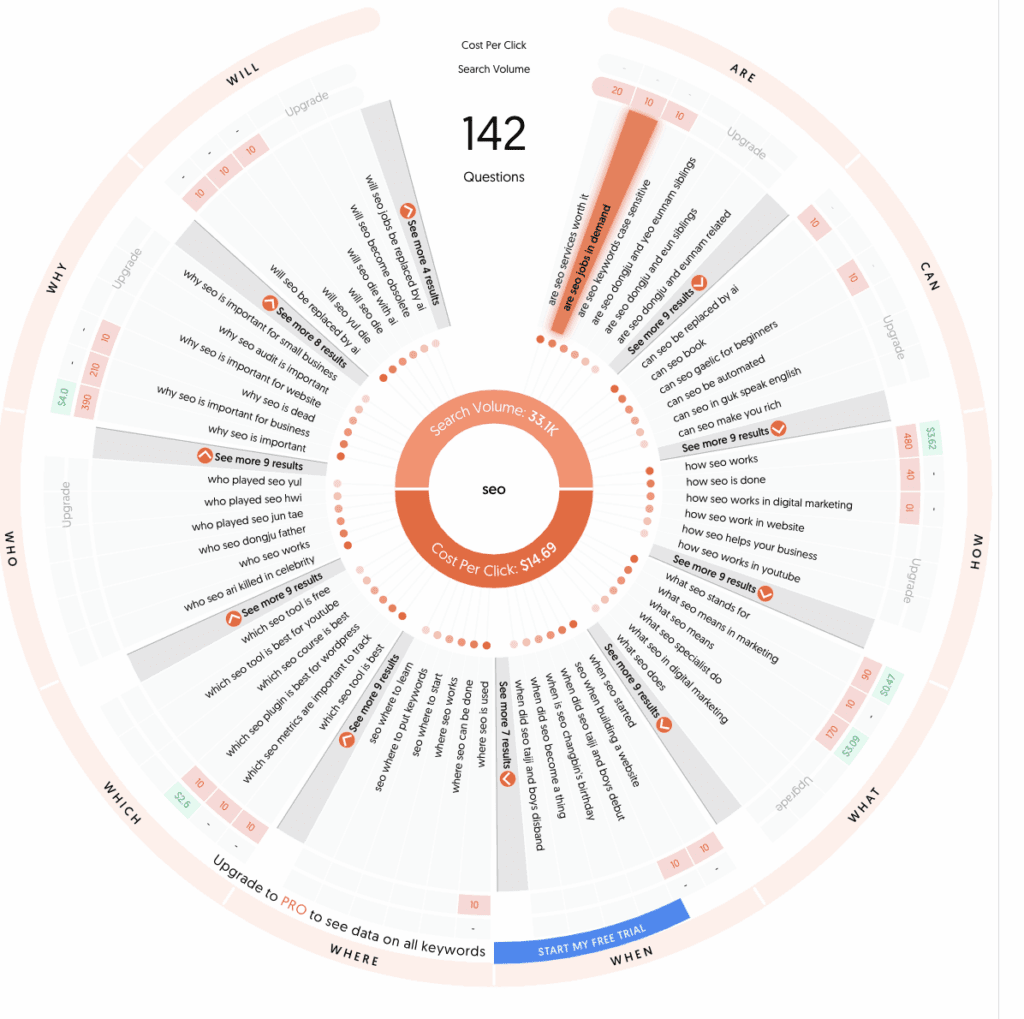
Answer the Public – you’ll have most likely seen the questions and answers that Google serves up whenever you do a search. This website collates what questions people are asking right now.
The best way to use this information? Answer them in pieces of content across your website!
Google Keyword Planner – this free tool uses Google’s data directly and by entering each of your keywords (you can upload an entire list to make it easier!).
It will tell you the volume of monthly average searches and how competitive those terms are.
If the search volume is zero, chances are that might not be what people are searching and another term is worth investing more time in.
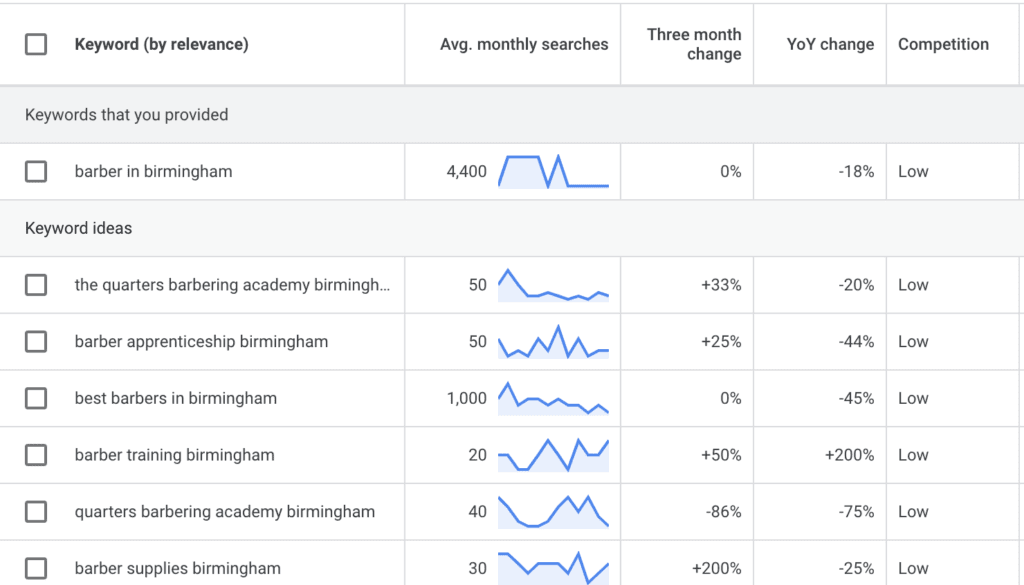
A handy SEO tip for Google Keyword Planner: you can search using a URL so if you have a competitor that does really well in search results, add their URL to the planner and see what keywords in pulls out and add them to your list.
There will be a few factors that will determine the order in which you start to create or optimise your content.
You will mostly likely need to start with pages that outline what it is you offer and where most people who visit will want to head to. Put this content near to the top of your list.
Then sort your combined list of keywords by keyword difficulty – most keyword tools allow you to do this – and use this order to inform your next steps.
If your website is brand new, it is a monumental task to try and rank for super high volume and competitive search terms.
Instead focus on the terms that indicate that someone might be ‘in the market’ for a service. A higher CPC indicates that other businesses are paying to rank for this term and so it must have some worth.
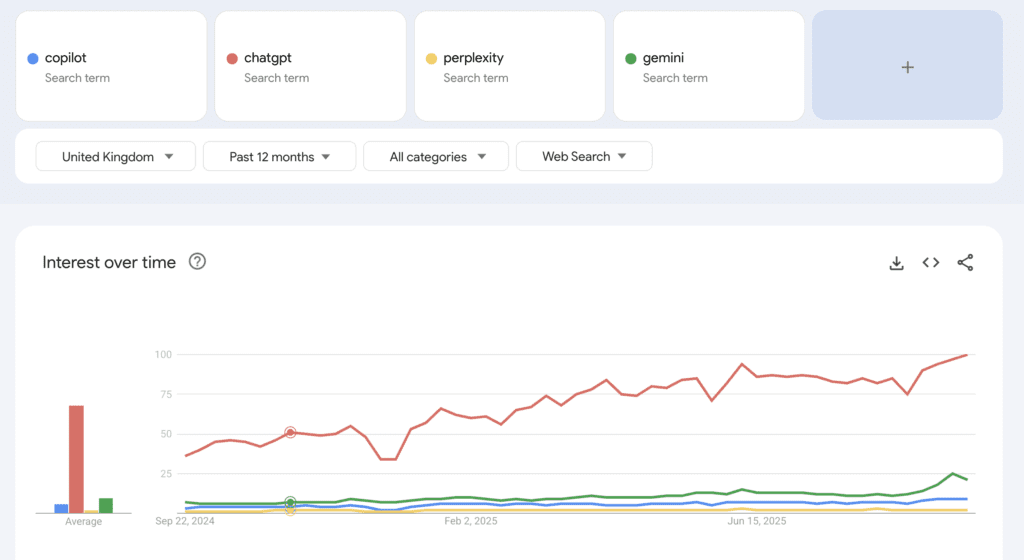
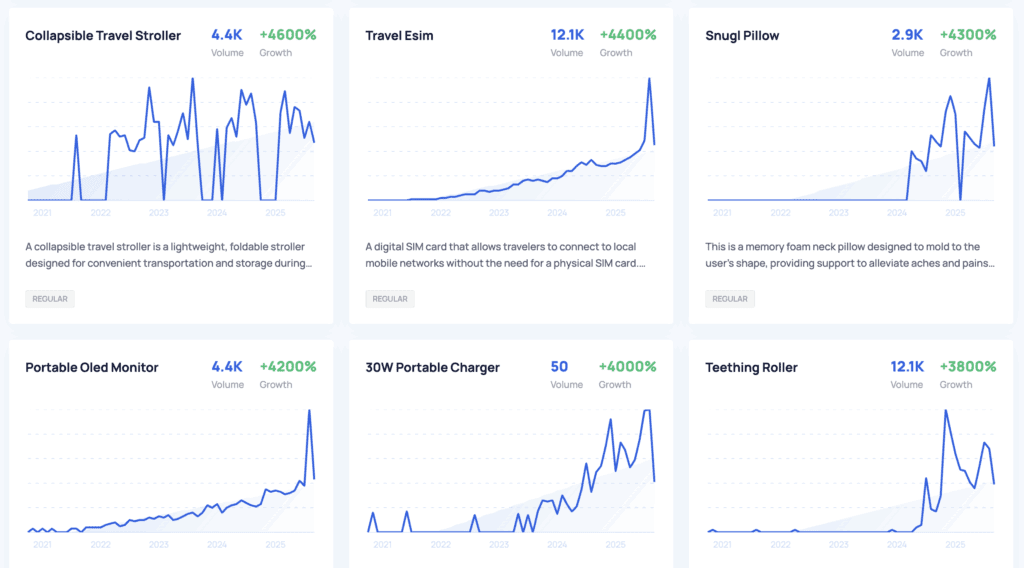
Also, focus on the keywords that are trending upwards. (Google Trends or Exploding Topics can be useful tools here). The logic here is simple. More people are searching this right now, so give the people what they want.
Finally, pay attention to the search volumes. As you have built your list you’ll have got a feel for the volumes and the ranges from high to low.
There is no true formula to decide what to start with, but using these indicators will give you a good steer when prioritising.
And off we go! You have your keyword that you want to rank for, what now?
First, Google it. See what the content that appears on page 1 is and use that to inform the content you will build. For example, are the top results all recipes? How-to guides? Service or product pages? Whatever you see is what people want to read, so go with that if you can.
Then, read all the content that is on page one and make your content better.
Does the number one result have 10 sections? Then your content should have 12. Can you add visual aids or interactive content that gets the reader to get what they need quicker?
How can you answer the reader’s question in more detail but in less time?
Once you know exactly what your audience is searching and what content is most suitable for your keywords, it’s time to actually get to work and write the content.
Your content should be keyword optimised, visually easy to read and built using On-Page SEO best practice.
Quite simply, put pen to paper. Keep that keyword in mind, but don’t obsess over the SEO elements just yet. Focus instead on your expertise, and what the purpose of this page or piece of content is.
Make sure that you are writing in sections and each section has it’s own heading.
As you write, think about what other pieces of content across your website are related to this piece and keep reminding yourself of what action you want a user to take after reading this content.
Does the top of your page highlight really clearly what the reader can expect to take away from reading this content?
Are you making good use of font-size i.e. do your headers immediately pull focus? If not, increase or reposition them so they do.
Make use of colour or imagery in your hero section – try not to make these too busy; again, we’re aiming for immediately comprehension.
Scroll further down your page.
Do you see any big blocks of text? If so break them up into smaller chunks and increase your use of headings so that even a quick scan can help the user skip to the information they need.
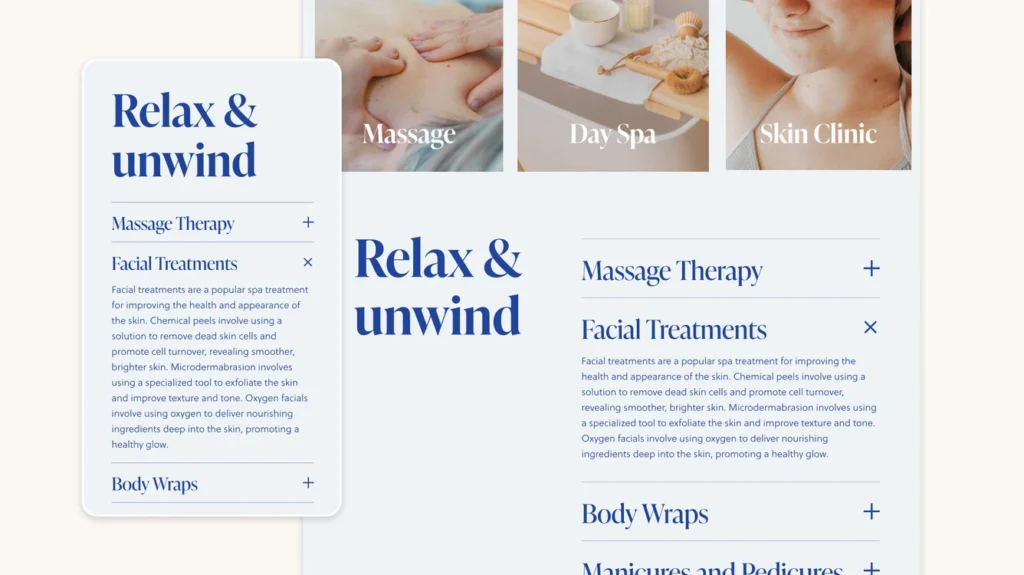
To add visual interest, take advantage of well-placed, quality images and page elements such as accordions or carousels, if appropriate. Any images you use, make sure they are light-weight or compressed with an image compressor.
Your content is written and looking great on the page thanks to headings and on-page features.
Now is the best time to revisit and start to optimise, starting with that all-important keyword.
As a rule of thumb, your keyword should be mentioned in your first paragraph, if not in your first couple of sentences. Not a huge ask if the content is written with the keyword in mind, right?
Next, make sure that your keyword is sprinkled throughout the content. How many times is it in your subheadings? How many times does it feature in various paragraphs?
The longer the piece of content, the more times you will have opportunity to make reference to your keyword.
BUT, keep it natural – if it feels like you’re altering the quality of the language to squeeze it in, you probably are. Natural use is always best for both the user and the search engine.
You don’t need to just focus on the same exact wording every time either. Google is smart and can figure out slightly altered versions of your keyword or related keywords so feel free to add variety!
Your Title Tag is possibly the most important element both for attracting users to click onto your website and for search engines.
Make sure that your keyword is featured in your title and description and both are succinct, clear and direct.
It’s really important that you title is no longer than around 60 characters and your description no more than 160 characters.
Your page or post URL is another small opportunity to highlight your keyword and Google encourages the use of descriptive URLs. Putting it in there is just another signal to Google about that topic of the piece.
Finally, do one last check of all of your headings. Your page or post Title should be your only H1. Section headings or subheadings should be H2 and headings of lesser importance H3, H4 and so on.
Linking is a huge part of On-Page SEO.
Every piece of content should form part of a wider eco-system of content and as such should link to important or related content.
Internal linking helps Google navigate its way through a website and adds to it’s understanding of the broader context that this piece if a part of. Hence, why Google finds these to be of such importance.
That said, you should still be selective about the content you link to. Higher value or priority content such as service pages are best.
You should also make sure that exact words or ‘anchor text’ you use to link are using keywords too, adding extra context and understanding for the page you’re directing to.
Once you’ve optimised your content, structure, and keywords, you need to make sure you are tracking the data to see that it is actually delivering traffic.
On-page SEO is measurable and by regularly reviewing the right metrics, you can spot opportunities, fix problems, and track improvements over time.
Both of these tools are totally free and are a non-negotiable tool when working to improve you SEO.
There are a few different ways to setup both of these platforms but we also offer Google Analytics packages that can support you in getting setup.
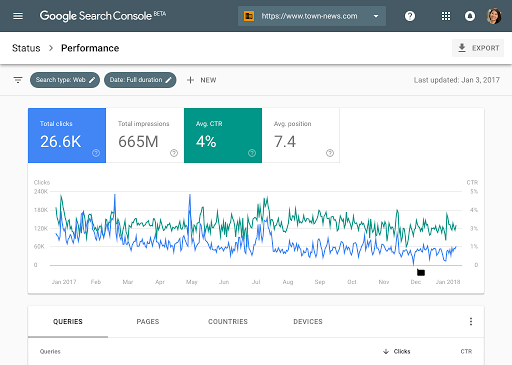
Search Console tells you how you’re performing in search results and Google Analytics tells you what happens after people land on your page.
Google Search Console will enable you to track:
Impressions: this is the amount of time your page appears in search results
Click Through Rate (CTR): how many times someone clicked through to your page from search results
Average Position: what position your pages appear on average in search results pages
Search Queries: What keywords people are searching to actually find your page.
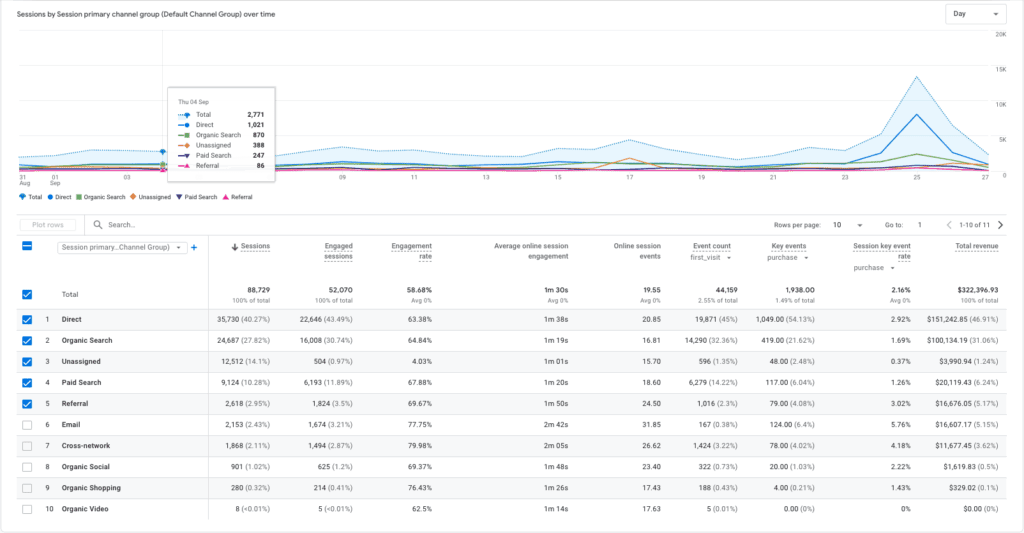
Google Analytics will enable you to track:
Bounce Rate/Engagement Rate: what percentage of people are hanging around and exploring your site vs. just leaving straight away
Time on Page: how long are people sticking around on the pages they have landed on
Conversions: how many people are completing the desired action on your pages i.e. completing a purchase, submitting a form, playing a video
With every change and optimisation you make on your website, you want to see those metrics and measures improving over time. When you see significant improvements, you will start to learn which content performs best. Replicating or producing more of that style of content should then lead to further traffic gains and higher rankings.
Free and paid SEO analysers can quickly scan your page and highlight optimisation opportunities. Some are more complex than others and will scan and make suggestions about the language used, while other free or lower cost tools will look at typical on-page SEO elements such as meta details, keyword density and link status.
Screaming Frog SEO Spider – A desktop crawler that gives a detailed breakdown of title tags, meta descriptions, headings, word counts, and broken links.
Ahrefs Site Audit / SEMrush On-Page SEO Checker – These are paid tools that analyse your page and will give much more detailed SEO analysis. They will compare against competitors and high-ranking pages. They will assess the content on these pages and compare your page against them and use this to make suggested improvements.
Yoast SEO (for WordPress) – A useful WordPress plugin that provides quick page-level feedback, especially for keyword placement and readability. The free version of this tool is great for SEO beginners who are building content on WordPress.
Off-page SEO (or Off-Site SEO) refers to all the actions you take outside of your website to help improve your website’s rankings in search engines. It’s about proving to Google (and your audience) that your site is valuable, trustworthy, and authoritative by showcasing how the world interacts with it.
Search engines treat every link that others make to your website, every mention in articles or blogs, and every citation on directories as a vote of confidence that you are a respectable and authentic voice on the subject your website talks about. The more high-quality votes you earn, the more likely Google will see you as authoritative and the more likely your site is to climb the rankings.
If ‘on-page SEO’ is the clearly presented content in your digital shopfront, ‘off-page SEO’ is your shop’s reputation in the neighbourhood where you want people to recommend visiting.
Improving your Off-Page SEO can be difficult and time intensive. It mainly involves:
Building backlinks from reputable and relevant sites to yours
Having an established presence on Google Business Profile and local directories
Being featured in blogs or articles about your area of expertise
Creating shareable content that encourages shares and referrals.
There is no single formula to follow for Off-Page SEO like there is for On-Page SEO or Technical SEO. You have to think a little more about your industry, your community and your place within both.
Building credible backlinks can take time but will become easier as your grow your reputation and figure out which tactics work best for you and your particular business.
This is an easy first step and if you are in the process of launching a brand new website, this will be a useful step for a few reasons.
Google Business Profile is a great place to start.
This is the featured snippet that you often see in Google search results when you search for a local business. You want one of these.
Once you’ve added all of your details, you will also have created your first backlink to your website.
Continue to do this on business directories such as Yelp, 192.com, Bing (you can import your Google Business Profile easily) and any others that are relevant to your industry.
This is what we call Local SEO and your business will really benefit from these actions if you are looking for local custom.
Finally, make sure that your website is linked on all of your various social media profiles – these might not provide what is known as ‘backlink juice’ (sort of SEO-points if you will) but they will still send positive signals and reinforce trust to Google and users that you are a genuine business and credible website to link to.
Once you are up and running and have a strong customer base, encouraging them to leave reviews on these platforms can be extremely powerful in boosting your exposure.
Backlinks remain the backbone of off-page SEO. They’re digital votes of confidence from other websites that tell Google your content is credible and worth ranking and putting in front of users who are making related searches.
However, the strategy should never be to obtain as many links as you can possibly get.
Quality matters more than quantity. A handful of links from high-authority, relevant websites will outweigh hundreds from weak or unrelated sources.
This is truly a long term game and can often be the trickiest part of SEO as it often requires outreach and creating curated content.
BUT these actions will benefit your businesses in other ways. It will introduce you to other players in your industry and boost your standing as a voice to be listened to across multiple platforms.
Some great ways to get started are:
Get in touch with local Chambers of Commerce or local business forums. Often these will be able to offer a variety of business support but they will likely have a business directory where your website can be linked from.
Explore other voices online who are talking about the same topics as you or industry-centric websites. Reaching out and offering a guest blog feature is a great way to self-promote and boost your SEO.
Offer to write testimonials for tools or products you use in your day-to-day and request to include a backlink.
Use a broken link browser extension to find broken links and suggest a piece of content on your website as a replacement.
The best links often come naturally from content that’s too good not to share.
Cornerstone pieces can be anything from ultimate guides (such as this one!), research reports, infographics, or downloadable tools can earn attention in your industry and beyond because they provide a useful resource.
If your content helps people solve a problem, provides unique insights, or packages information in a way that’s easy to consume (like a checklist or calculator), it has a higher chance of being shared and linked to without you even asking.
Sharing your content on social media is a no-brainer of course, but make sure you’re doing it right.
Simply copying and pasting your link with a one-line caption is neither going to satisfy your audience or the algorithms.
Instead, pull out some key takeaways from your article. Or share a summary of the journey you took from hypothesis to result.
This satisfies the algorithms need for decent, engaging content and also encourages shares from users which in turn will increase the likelihood of organic backlink building.
Every piece of content your create doesn’t need to be directly related to driving custom to your business.
The best content strategies will include a variety of purposes – some to establish you as a credible voice, some to highlight changes to trends or innovations, and some to highlight your services or products.
Creating industry insights or thought leadership-style articles that can offer a new perspective or insight on a topic is a great way to be featured in local or industry-specific publications.
Do some research into local charities or community projects and think about how your business can support.
Find local or industry relevant podcasters and offer to share your perspective or experiences.
All of these actions have the effect of driving backlinks and social shares but will also drive incredible brand awareness for you and your business overall.
Off-page SEO can feel a little abstract compared to on-page work. You’re building relationships, earning mentions, and creating content that spreads across the web.
So how do you actually know if it’s working? There are a number of ways to track the effectiveness of Off-Page SEO which can then help you focus your efforts for the future.
Referral traffic on your GA4 reports show the traffic that has come to your website through clicking a link on another website.
Tracking this over time will give you loads of useful information.
You will be able to see how much of your traffic is driven by other people linking to your website.
But you will also be able to see what websites specifically that traffic is coming from.
Going a step further you can assess what that traffic then goes on to do on your website so you can then see which websites drive the highest-converting traffic.

Backlinks are the heart of off-page SEO, so keeping an eye on them is a really important way to measure SEO success. You want to always strive for high quality and relevant links.
A link from BBC News or an industry authority site is like getting a recommendation from a well-respected expert.
Tools like Google Search Console (which is free) or Ahrefs, SEMRush or Moz (which are paid subscriptions), can show you varying levels of detail around the number of quality of links.
The paid tools will make an assessment on the quality of the websites that refer to you and therefore the quality of the link.
Qualitatively, you should also pay attention to the relevance of the sites that are linking to you, ensuring that they are within your industry or logical. You should also note the anchor text of the link i.e. that the linked text says something like “seo specialist” rather than just “click here”.
If you’re a business with a focus on driving localised traffic, local signals are crucial. Your Google Business Profile can give you some real insights into how you are performing locally.
What to check in Google Business Profile Insights:
Search views: How often your business appears in local search results.
Actions taken: Clicks to your website, calls, direction requests.
Reviews: Are you getting more, and are they positive?
Technical SEO is almost exactly what it sounds like. It’s to do with the way your site is built and that everything works as it is supposed to for a user.
If on-page SEO is your shopfront, off-page SEO is your reputation, then technical SEO is the structure of your building.
It’s about making sure your website is built in a way that search engines can easily crawl, understand, and index.
Technical SEO focuses on things like site speed, mobile-friendliness, site architecture, structured data, and security.
Think of it as the plumbing and wiring of your website; invisible to most visitors but absolutely essential for everything to run smoothly.
It’s important that you are checking up on this regularly, or employing a website maintenance service, as things change over time – updates might alter a layout or Google’s updates could mean some tweaks to your website are required.
Some of the critical reasons why Technical SEO is important are:
And by ‘everyone’ we mean for every type of user, particularly those who might have accessbility requirements, and for every Search Engine.
Google will be clocking the amount of time that users are spending on your page and using that as an assessment on your website quality. It will also be constantly crawling and indexing, so we want to make sure there are no barriers.
Search engines use bots (“crawlers”) to scan your website. These are exactly what they sound like – little messengers who constantly crawl the web, collecting website data.
This data is then reported back to Google and indexed. Google will use this information to determine how to rank each website.
If they can’t crawl your pages, they can’t index them, and therefore they can’t rank them.
A ‘noindex’ tag on a page will send a message to Google that this page is not to be shown in results.
Ensure you don’t have these tags on any of the pages that you do want people to find.
Similarly, if you have duplicate content, this can be confusing to Google as it doesn’t know which one to show and in most cases will show neither.
You should choose the best version and have any similar links redirect to it. That way Google knows this is the best ‘version of the truth’.
You can submit a sitemap to Google Search Engine to help it understand your sites structure and encourage it to crawl multiple pages.
Both Google and web users loath a slow, laggy website.
Having bulky videos or high-resolution images or embedded applications that take ages to load is a surefire way to ensure that your website is slow.
And Google does not look kindly on slow websites.
You should always ensure that images are being compressed so they are lightweight. You can use online image compressors to do this, or if you use WordPress, a plugin such as Shmush.
Other actions include minifying CSS, JavaScript, and HTML and enabling browser caching.
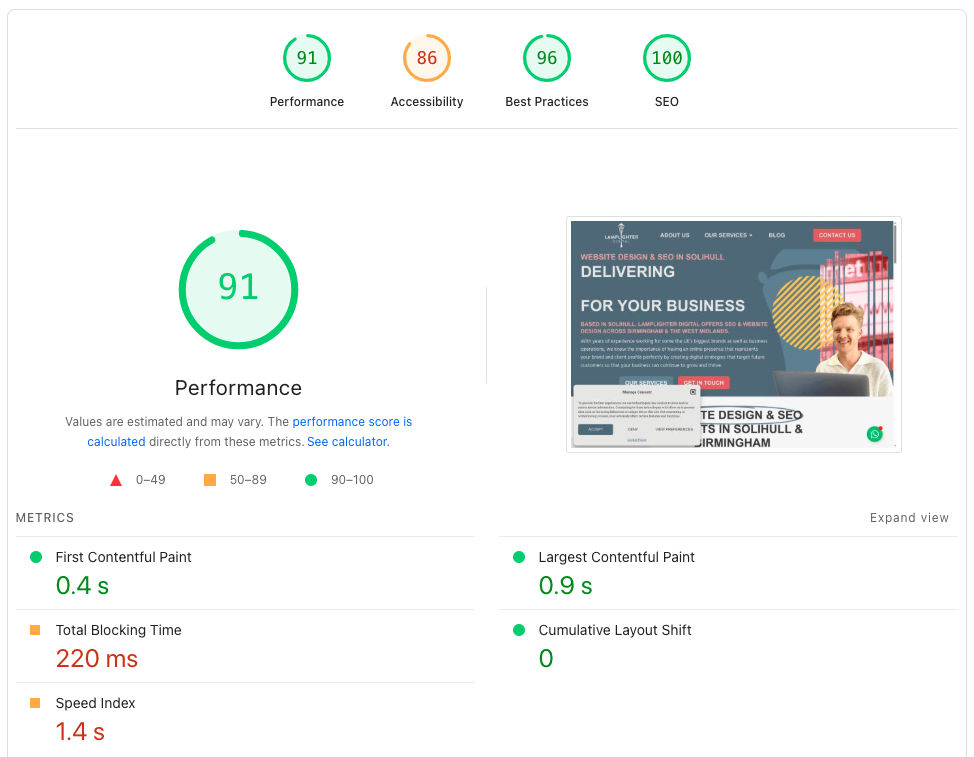
You can check both your mobile and desktop load speeds by using Google PageSpeed Insights which will give you a score out of 100 and some helpful tips to improve.
Google has confirmed that site security is a ranking factor.
Beyond SEO, users are far more likely to trust your site if they see the little padlock symbol in their browser.
If your site still shows as “Not Secure,” it could be hurting both rankings and conversions.
Free SSL certificates are provided by most website hosting companies so you should ensure that yours is installed correctly.
A way to test is to attempt to access your website by putting http:// at the beginning. If you get automatically redirected to https:// version then you are secure.
It’s also vital to ensure that any plugins, applications or software is kept regularly updated. A website that falls behind on updates can be at major risk of security breaches.
Since Google switched to mobile-first indexing, your site’s mobile version is the one primarily judged for rankings.
That means if your site doesn’t work well on mobile, you’re immediately at a disadvantage.
You should ensure your website:
Has responsive design: Ensure your website automatically adjusts to different screen sizes (desktop, tablet, mobile).
Has readable text: Avoid tiny fonts and stick to a minimum of 16px for body copy. Check colours for accessibility on websites like this colour contrast checker.
Tap-friendly buttons: Buttons and links should be large enough to tap without zooming in.
Avoid intrusive interstitials: Popups, banners, or overlays that cover most of the screen frustrate users and can hurt rankings.
Test regularly: What looks good on your phone might not look good on a tablet or an older device.
A clear site structure helps users find what they need quickly, and search engines crawl your site efficiently.
A confusing, cluttered structure can leave important pages hidden and thus weaken their chance of being ranked.
What to do:
Plan a simple navigation structure (hierarchy): Homepage → Categories → Subcategories → Individual pages. Avoid going deeper than 3 clicks where possible.
Keyword-friendly URLs: Keep them short, descriptive, and relevant (e.g. /services/SEO rather than /page?id=12345).
Internal linking: Link between related articles and service pages. This distributes “link equity” and helps Google understand which pages are most important and how they relate to one another.
Breadcrumb navigation: Add breadcrumbs so users (and crawlers) can see exactly where they are on your site.
XML sitemap: Keep it updated and resubmit it to Google Search Console if you make any major changes or additions to your website.
By now, you’ve seen that SEO isn’t just a one time checklist. It’s an ongoing job and a blend of different strategies:
On-page SEO for optimising your content and structure,
Off-page SEO for building authority and reputation, and
Technical SEO for making sure your site runs smoothly under the hood.
When these three pillars work together, your website is primed to attract more traffic, more leads, and more customers for your business.
But here’s the reality: SEO takes time, consistent effort, and a strategy that keeps pace with Google’s constant updates.
The payoff for good SEO is well-documented and is often discussed as one of the best investments businesses can make in their long-term growth plan.
But for small business owners or medium-sized businesses without dedicated SEO experts, this can be really difficult to keep on top of and do consistently well.
At Lamplighter Digital, we help businesses with their SEO in Solihull, SEO in Birmingham, and in businesses across the West Midlands.
Leave it to us to turn SEO theory into measurable results. Whether you need a one-off strategy session or ongoing SEO management, we’ll make sure your website isn’t just found; it’s trusted, clicked, and converting users into customers.
If you would like to discuss our SEO packages and how we can start more driving traffic to your business, use our Contact Form to set up a Discovery Call today.